


An online store is what helps you transform ideas into a business. With tools like an online store builder, anyone can build a fully functional store. No coding required and no large investments needed. Platforms like Store.link have made the entire process simple by letting anyone create a complete store directly from Google Sheets.
Your online store is not just a place to sell products. It’s where your brand actually lives online. When someone searches for what you offer, this is the space that shows up and represents you. People don’t just buy because a product exists; they look at your website, how it feels, what it says, and whether they trust it. That first impression matters more than most expect, and in many cases, it’s what decides whether they stay or leave.
Have you ever wondered whether you need a full online store for your business idea? This guide has everything you need, from the basics to the FAQs.
Table of Contents:
- What Is An Online Store?
- How Does An Online Store Work?
- Features Of An Online Store
Core Features
Advanced Features - What Makes Store.link Different?
- Advantages Of An Online Store
- How To Start An Online Store With No Money?
- What Is The Best Online Store Platform?
- Why Store.link Is The Best?
- Conclusion
- FAQs
What Is An Online Store?
An online store is a website or a digital platform where you can buy or sell goods or services online. Customers can browse through the pages and look at the product catalogues. They can take ample time to take a look at everything. Or, they can easily choose what they need by sorting. Then, they can add items to the cart and proceed to checkout. Payment can be completed using any of the various methods available.
What Is An Online Store In Simple Words:
- Shop on the internet
- Anyone can access anytime
- Physical location not needed
How Does An Online Store Work?
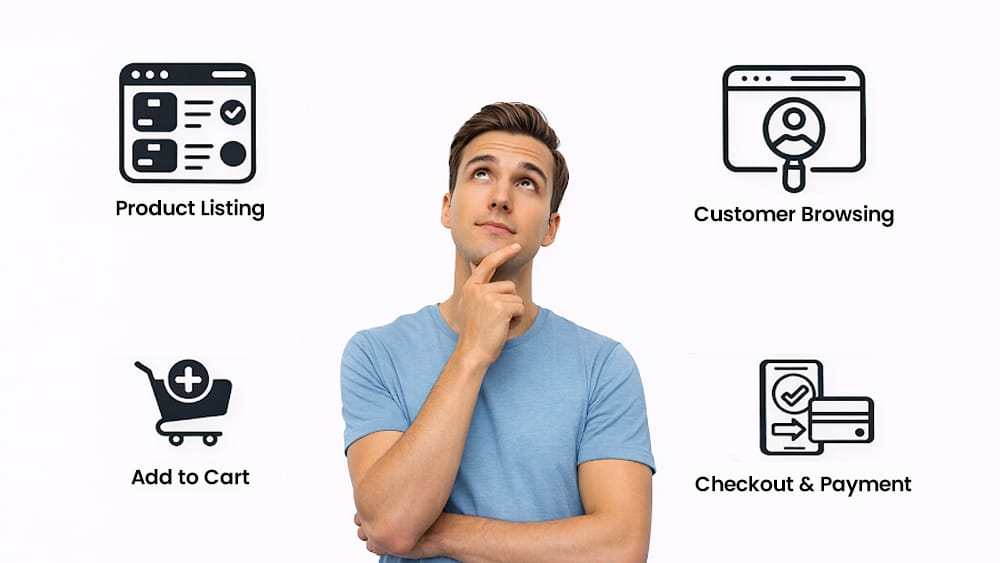
Understanding how does an online store works actually helps you if you want to set up one. Here is the basic workflow of an online store.
Basic Workflow:
Product Listing
Product details are uploaded - images, price, description.
Adding more description will help the customer to understand the product, which in turn will boost sales.
Customer Browsing
Visitors explore the store. They browse through the products.
Add To Cart
Customers choose what they want to buy. Chosen products are added to the cart.
Checkout & Payment
Secure payment gateways to process transactions
Order Management
All orders are tracked well. It is verified that all customers receive what they purchase.
This entire process is automated at Store.link website builder tools. It is as simple as:
- One row in a Google Sheet = One Product
- All updates are synced in real time
- You can get orders through emails, WhatsApp, and Google Sheets
Features Of An Online Store
It is the features of an online store that determine its success by attracting more customers.
Core Features Every Online Store Has:
- Product Listings
- Shopping Cart & Cart Checkout
- Payment Integration
- Search & Navigation
- Customer Accounts
- Order Management
Advanced Features For Top Online Stores:
- Mobile-friendly design
- SEO optimization
- Discount coupons
- Credits for frequent buying
- Multiple payment gateway options
- Analytics & tracking
These are the features of an online store that matter the most.
What Makes Store.link Different?
Unlike old school platforms:
- Built entirely on Google Sheets (no heavy coding needed)
- No need to manually upload products
- Real-time inventory syncing
- 0% commission on all plans
Additional Benefits:
- Receive orders via WhatsApp, email, and Google Sheets
- Powering 15,000+ stores worldwide
Advantages Of An Online Store
The countless advantages of an online store are the real reason why a lot of people are choosing it repeatedly.
Global Reach
You can sell to anyone, anywhere
24/7 Availability
There is no ‘closed’ time. People can purchase at any time
Low Costs
No rent, no large team required
High Scalability
Add any number of products without needing more space to contain them
Improved Customer Insights
Track customer behaviour, preferences, and sales data
Easy Inventory Management
All inventory easily managed using Google Sheets
📈 Global e-commerce is expected to cross $8 trillion by the year 2027
📈 More than 2.7 billion people shop online globally
How To Start An Online Store With No Money?
This is what everyone asks: “how to start an online store with no money?” And, is it even possible?
Yes, and it’s more accessible than you think.
Step-by-step Approach To Launch An Online Store Without Money
What Is The Best Online Store Platform?
There are multiple online store platforms where you can buy and sell things. However, choosing the right one for you depends on what you need. So, before answering ‘what is the best online store platform?” let us read what you should look for in one.
What to look for in an online store platform?
- Ease of use
The online store website should be easy to navigate. Buyers should be able to easily browse through product catalogues, find products, place orders, and complete their payments.
- Relevant features
The platform should regularly ship updates and new features to stay competitive. Therefore, all the latest features should be added from time to time. This is significant; otherwise, the store would feel outdated.
- Scalability
The store should be able to handle a high number of customers. And, all customers should get a smooth experience without crashes and delays.
Popular Online Store Platforms
- Store.link - Google Sheets powered, 0% commission, free plan
- Shopify - Feature-rich, but charges transaction fees
- WooCommerce - Flexible; however, hosting and technical setup needed
- Wix - Easy to build, but restricted ecommerce depth
Why Store.link Is The Best?
Let us see what makes online store builder platforms such as Store.link so different from others.
Built completely on Google Sheets
You just have to manage the Google Sheets, which means that anyone can handle this online store without having any training.
No codes needed
Generally, a high level of coding is required to develop online stores. However, Store.link helps people with no coding background to launch online stores.
Real-time updates
All updates are synced to the sheet in real-time. You can now receive orders on Google Sheets. Also, on WhatsApp and email.
Free plans available
A free forever plan is available with all core features. With free plans, you get all the core features. And, with premium plans, you can get the most advanced features.
0% commission on sales
Unlike many other platforms that take away your income from each sale as commission, Store.link takes 0% commission.
Unlike traditional platforms that require
Available pricing plans at Store.link:
- Free
- $10-$14/month
- $25-$29/month
- $45-$49/month
With Store.link, you do not have any barriers to start your free store.
Also read: How to Create an Online Store: Step-by-Step Guide for Beginners
Conclusion
Online stores are not a concept anymore. Many have already started to commercialise it. If you have a business idea, you should definitely turn that into a success. Start online, perform well, and scale. Then, you can also open physical stores. We hope you already know about the many advantages of an online store. Create your free store at Store.link in under 5 minutes, and all you need is a Google Account.
FAQs
What is online store vs ecommerce?
An online store is specifically for selling goods. Think of it as a digital storefront for your business platform. It is a type of e-commerce platform. An e-commerce platform often includes buying and selling, and it often includes apps and marketplaces.
How much does it cost to start an online store?
Starting an online store can sometimes cost $50 or even up to $500. However, there are platforms like the Store.link that make it absolutely possible to launch an online store with no money. You have free plans with the core features. Paid plans vary - 10-$14/month, $25-$29/month, and $45-$49/month
How does an online store work?
An online store displays products to customers. They can add these to their carts and proceed to checkout. After successful payment, the purchased items will be delivered to them on time. An online store works by automating all these processes.
Is it worth having an online store?
Yes, it is worth having an online store. Everyone is an online shopper these days. Opening an online store is the best way to increase visibility and demand for your products. These directly help boost sales.
Can I start an online store without inventory?
Yes, you can start an online store without any inventory. An online store exists and operates in the virtual space. Therefore, there is no need to set up any inventory. Store.link lets you start an online store just with Google Sheets.
Do I need a business license for an online store?
No, you do not usually need a business license to start an online store. Although you can get a license for the business you are running. Also, licensing an online store is based on your location.
How do I accept payments on my online store?
To accept payments, you need to connect your store to a payment gateway. Customers have options to pay using different payment methods. Which will then be transferred into your bank account.