
Disable the Store
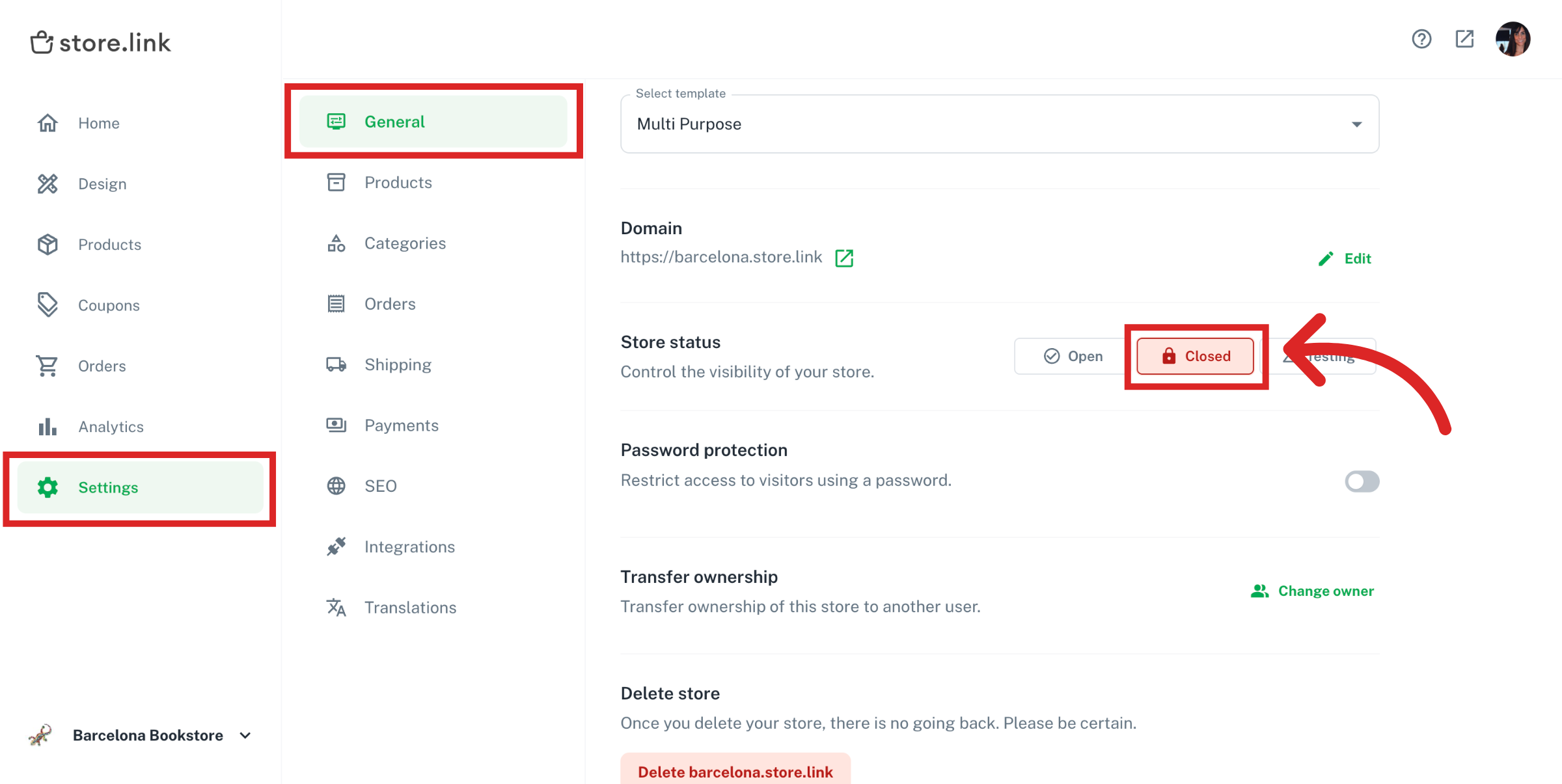
You can always disable your store temporarily from Settings > General on your dashboard by choosing Closed for Store Status.
Once you close your store, the store URL will still be available, but your store will no longer accept orders.
Delete the Store
You can delete your store permanently by going to Settings > General on your dashboard. Please note that it will not be possible to restore a store once it has been deleted.

Cancel Subscription
To cancel your subscription, go to the billing page and click on Manage Cards & Subscriptions. This will prevent further payments from your card. You can upgrade your store later anytime.
Permanently Delete Account
We are sorry to see you go. Deleting your account is permanent and irreversible. All of your online stores and the data that was collected will be removed from our servers. Data stored in your Google Sheets stays in your Google account.
You can delete your account in two ways:
In the Storelink mobile app: open the app and tap Delete Account, then confirm. See How to use Storelink mobile app.
By email: send a message to [email protected] from your account email, asking us to delete your account. We'll confirm once it's done.
If you're on a paid plan, cancel your subscription first (see above) so you aren't charged again.
Still need help?
Contact us